
A single wrong order costs more than the food itself. It costs a customer’s trust, a five-star review, and more often than not, their return visit. In fast casual dining, where guests choose you specifically for speed and convenience, operational errors hit harder than anywhere else on the restaurant spectrum.
The difference between a restaurant that consistently gets orders right and one that doesn’t usually comes down to one thing: the systems running behind the counter. Modern restaurant POS software has evolved well beyond a billing tool. Today it’s the central engine connecting your staff, kitchen, payments, and guests into one seamless operational flow — and in 2026, the restaurants winning on accuracy and speed are the ones that have fully committed to that infrastructure.
Here are 10 specific, practical ways restaurant POS software improves order accuracy and service speed — and why each one matters directly to your bottom line.
1. Instant Order Transmission to the Kitchen
The moment a customer finishes ordering, accuracy depends entirely on what happens next. In restaurants still operating without a modern restaurant order management system, the order travels as a handwritten ticket or a shouted instruction across the kitchen pass. Both introduce errors that are nearly impossible to catch before the plate reaches the guest.
Restaurant POS software sends orders directly to a Kitchen Display System the instant they are entered. There is no paper ticket to misread, no verbal instruction to misinterpret, and no delay between the counter and the grill. The kitchen sees exactly what was ordered — modifiers, quantities, and special instructions — in real time, every time.
Why this matters for order accuracy:
-
Eliminates handwriting misinterpretation that costs you remakes
-
Removes the verbal relay chain between front and back of house
-
Creates a digital record of every order for full accountability
-
Reduces food waste from incorrectly prepared dishes
Restaurants using integrated kitchen display system technology consistently report fewer kitchen errors and faster average ticket times because preparation begins the moment the order is confirmed — not when a paper ticket eventually makes it to the line.
2. Smart Modifier and Customization Handling
Fast casual dining runs on personalization. Extra sauce, no onions, gluten-free bun, double protein — these requests are everyday occurrences across every US fast casual concept. Managing them accurately under rush-hour pressure is one of the most consistent operational challenges restaurant operators face.
A well-designed fast casual POS system presents modifiers as structured, tappable options within the ordering interface. Staff do not need to type free-text notes or rely on memory to capture a long list of customizations. The system guides them through available options, validates combinations, and sends the complete formatted instruction directly to the kitchen — eliminating the guesswork that causes wrong orders.
Key capabilities that reduce order errors:
-
Preset modifier groups for common changes — size, extras, dietary restrictions
-
Required modifiers that prompt staff before an order can be confirmed
-
Combination rules that prevent invalid or conflicting customizations
-
Clear, structured formatting of all special instructions on the KDS ticket
When customization is systematic rather than manual, the error rate drops significantly. Customers get exactly what they asked for. The kitchen knows precisely what to prepare. And your team spends less time correcting mistakes and more time delivering great service.
3. Self-Order Kiosks Reduce Counter Pressure
Counter bottlenecks are one of the most visible and costly service failures in fast casual dining. When the line builds during peak hours and staff are managing multiple transactions simultaneously, rushed order entry becomes a primary driver of inaccuracy and slower restaurant service speed.
A self-order kiosk shifts the ordering responsibility to the guest in a way that actually improves accuracy. Customers take their time, review the full menu visually, build their order at their own pace, and confirm everything before submission. The result is an order that precisely reflects what they want — without a staff member having to interpret, rush, or re-confirm under pressure.
Operational benefits for front-of-house operations:
-
Reduces pressure on counter staff during peak service windows
-
Eliminates mishearing in noisy environments — a common source of fast casual errors
-
Increases average order value through integrated visual upsell prompts
-
Frees staff to focus on food preparation, quality control, and service
Self-order kiosks integrated with your restaurant POS software feed directly into the same order management system, ensuring seamless back-of-house coordination between the customer, counter, and kitchen without duplication or delay.
4. Unified Dashboard for All Order Channels
Modern US restaurants operate across multiple ordering channels simultaneously — walk-in customers at the counter, QR code ordering from tables, direct online orders from your website, and third-party delivery platforms like Uber Eats and DoorDash. Without a unified restaurant order management system, managing all of these at once creates serious coordination breakdowns that cost you orders and reputation.
Restaurant POS software consolidates every order source into a single unified order dashboard. Your team sees all incoming orders in one place, regardless of channel. Priority queuing ensures nothing falls through the cracks during your busiest service windows.
Problems a unified dashboard solves:
-
Eliminates missed or duplicated orders from separate channels
-
Provides a single queue view for consistent back-of-house coordination
-
Ensures preparation standards stay consistent across dine-in and delivery
-
Removes the need for multiple devices and screens cluttering your counter
For restaurants that have added delivery or online ordering — which is most US fast casual concepts in 2026 — a unified POS dashboard is the difference between managed, profitable growth and chaotic, error-prone service.
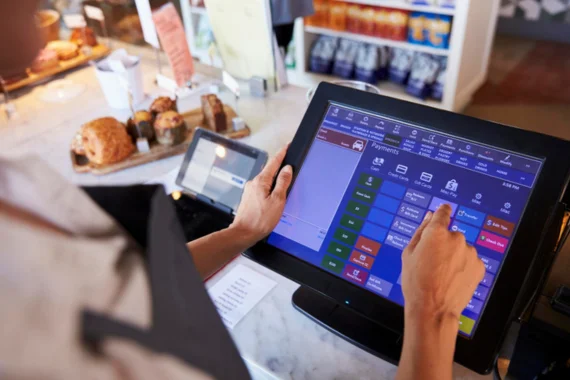
5. Faster Checkout with Contactless Payments
Checkout speed is a direct driver of restaurant throughput and table turnover rate. Every extra minute spent at the payment terminal extends the line, delays the next guest, and reduces how many covers you can move through during peak hours.
Modern restaurant POS software supports contactless restaurant payments, digital wallets, QR code ordering and payment links, and split billing — all of which reduce transaction time significantly compared to traditional card-present processing. Guests who can tap their phone and go are through the door faster, and your counter turns over more efficiently.
Payment capabilities that accelerate service speed:
-
Tap-to-pay and NFC wallet support — Apple Pay and Google Pay as standard
-
QR code payments for tableside and kiosk checkout
-
Split billing without manual calculation slowing down the transaction
-
Integrated tipping prompts that add value without adding friction
Beyond speed, flexible payment options improve overall guest satisfaction. A customer who pays the way they prefer leaves with a better impression — and that impression influences whether they come back and what they say about you online.
6. Real-Time Inventory Alerts Prevent Stockout Surprises
Few things damage the guest experience more than placing an order and being told minutes later that the item is unavailable. It is frustrating for the customer, awkward for your staff, and entirely avoidable with the right restaurant inventory management POS in place.
Restaurant POS software with real-time inventory tracking monitors stock levels as every order is placed. When a menu item approaches a low-stock threshold, the system flags it before staff takes another order for that item. Menus can update automatically across all terminals and ordering channels simultaneously — preventing the scenario where an online customer orders something your kitchen ran out of an hour ago.
How real-time inventory management protects your operation:
-
Prevents over-selling items that are running low during service
-
Alerts kitchen staff to prepare for likely stockouts before they happen
-
Supports smarter purchasing decisions based on actual consumption data
-
Reduces waste by surfacing slow-moving items that need promotion or removal
When inventory data is connected directly to your order fulfillment workflow, the gap between what you have and what you are promising customers disappears entirely.
7. Peak-Hour Analytics Enable Smarter Staffing
Understaffing during a Friday lunch rush and overstaffing on a slow Tuesday afternoon are both costly — one damages your service and your reviews, the other damages your labor margins. Most restaurants struggling with this problem are making staffing decisions based on experience and intuition rather than data.
Restaurant POS software generates detailed real-time restaurant analytics on your busiest hours, most popular items, average order processing times, and transaction volumes broken down by day, week, and month. This data transforms fast casual restaurant peak hour management from a guessing game into a precision exercise.
What POS analytics reveal:
-
Exact times when order volume peaks by day of week and season
-
Average time from order entry to order fulfillment
-
Which menu items slow down kitchen output during rush hours
-
Comparative performance across shifts, staff members, and locations
With this visibility, you can schedule the right number of staff at the right times, prepare for predictable demand spikes, and eliminate the service degradation that comes from being caught off guard by volume your own data could have predicted.
8. Order Status Visibility Reduces Customer Anxiety
Waiting for food feels longer when you have no idea where your order stands. That uncertainty translates directly into counter interruptions, visible impatience, and a perception that your service is slower than it actually is — even when your kitchen is performing well.
Restaurant POS systems power customer-facing order status displays, queue number boards, and SMS notifications that tell guests exactly where their order is in the fulfillment process. The customer who knows their order is being prepared is a calmer, more satisfied guest — even if the actual wait time is identical.
Order visibility tools available through modern POS platforms:
-
Kitchen queue displays showing real-time order progression
-
Counter-side number call systems integrated with KDS completion status
-
SMS notifications for online and delivery orders at every status change
-
Self-service order tracking via QR code or mobile link
Reducing perceived wait time is not about making customers wait less — it is about giving them enough information to feel in control of their experience. This is a low-effort, high-impact improvement that directly affects your online ratings and repeat visit rate.
9. Automated Upsell Prompts Increase Order Value
Every interaction at the counter is an opportunity to add genuine value for the customer and increase revenue for your restaurant. But in a busy fast casual environment, staff naturally focus on processing orders quickly rather than consistently suggesting upgrades or complementary add-ons.
Restaurant POS software configures context-aware upsell prompts that appear automatically based on what is being ordered — for both staff-assisted and self-order kiosk transactions. A customer ordering a burger sees a prompt for a drink combo. A family order triggers a dessert suggestion. These prompts are relevant, non-intrusive, and applied consistently across every transaction regardless of who is working the counter.
What automated upselling through POS delivers:
-
Higher average order value without additional staff training or incentive programs
-
Consistent upsell messaging across all staff members, shifts, and locations
-
Data on which upsell combinations convert most effectively for menu optimization
-
Personalized suggestions based on individual customer order history through loyalty integration
When upselling is built into the ordering flow rather than left to individual staff initiative, it becomes a reliable, measurable revenue driver rather than an occasional bonus that depends on who happens to be working.
10. Integrated Loyalty and CRM Improve Repeat Accuracy
Returning customers are your most valuable guests. They already trust your brand, they spend more on average, and they are far more likely to recommend you to others in their network. But their loyalty can erode quickly if they feel like a stranger every time they walk through the door.
Restaurant POS software with integrated CRM and loyalty tools tracks individual customer purchase history, saved preferences, dietary notes, and reward point balances. When a repeat guest orders — at the counter, through the kiosk, or online — the system surfaces their preferences, applies relevant rewards automatically, and delivers a personalized experience that makes them feel genuinely recognized.
How CRM-driven accuracy improves retention:
-
Saved order preferences reduce customization time for every repeat visit
-
Loyalty points are tracked and applied automatically without manual calculation
-
Targeted SMS and email promotions are sent based on purchase history and visit frequency
-
Customer satisfaction data helps identify at-risk guests before they stop coming back
Personalization at the scale US fast casual restaurants operate at is only possible when your restaurant order management system captures and activates customer data intelligently. The restaurant that remembers your order is the restaurant you go back to — and the one you tell your colleagues about.
Conclusion
Order accuracy and restaurant service speed are not just operational metrics. They are the foundation of your customer experience, your online reputation, and your long-term growth trajectory. In a competitive US fast casual market, guests choose you the first time based on food and price — but they return based on how smooth, reliable, and personalized your service consistently is.
Restaurant POS software addresses the root causes of service failure at every level: miscommunication between counter and kitchen, rushed order entry under pressure, fragmented multi-channel order management, slow payment processing, and reactive staffing that leaves your team underprepared for peak demand. When these are solved systematically through the right technology, the improvement shows up immediately in shorter queues, fewer remakes, stronger reviews, and higher revenue per cover.
Milagro’s restaurant POS platform brings all ten of these capabilities together in a single integrated system built specifically for the pace and complexity of modern fast casual operations. From the moment an order is entered to the moment a guest returns for their next visit, every step is faster, more accurate, and more connected.
Frequently Asked Questions
How does restaurant POS software improve order accuracy?
Restaurant POS software improves order accuracy by transmitting orders directly to the kitchen display system the moment they are entered, eliminating handwritten tickets and verbal relay errors entirely. Structured modifier handling ensures every customization is captured precisely, and a unified dashboard consolidates all order channels so nothing is missed or duplicated.
What is the fastest way to reduce wait times in a fast casual restaurant?
The most effective combination is self-order kiosks to eliminate counter bottlenecks, contactless payment processing to accelerate checkout, and a unified POS dashboard that keeps all order channels synchronized. POS analytics also enable smarter peak hour staffing so your team is never caught underprepared during high-volume windows.
Can a POS system handle online and dine-in orders simultaneously?
Yes. Modern restaurant POS software consolidates dine-in, takeaway, QR code, and third-party delivery orders into a single unified dashboard. This gives your team one accurate view of all incoming orders, prevents duplication, and ensures consistent preparation standards regardless of how or where the order originated.
How does a kitchen display system reduce restaurant errors?
A kitchen display system receives orders directly from the POS in a clear digital format, eliminating paper tickets and verbal instructions entirely. Every order appears with full modifier details, quantities, and special instructions. The kitchen confirms preparation and marks orders complete in real time, keeping the front of house informed and reducing the chance of errors at every stage of order fulfillment.
How do loyalty programs in a POS system improve the customer experience?
Integrated loyalty programs in restaurant POS software track customer purchase history, reward point balances, and individual preferences automatically. Returning guests receive a personalized experience — their past orders are saved, relevant promotions are applied at checkout, and reward redemption happens without manual calculation — making every repeat visit faster, smoother, and more satisfying.
Give every guest real-time visibility into their order — with Milagro.